
Yoast SEO WordPress: Setup, Features, and Workflow Guide
Yoast SEO is one of the most widely used WordPress plugins, with over 10 million active installations. It handles on-page analysis, XML sitemaps, schema markup, and now AI-assisted content tools. But installing it is only the first step. This guide walks through setup, the free vs Premium decision, and how Yoast fits into a broader content workflow.
What Yoast SEO actually does on WordPress
Yoast SEO WordPress: Setup, Features, and Workflow Guide - What Yoast SEO actually does on WordPress.
Yoast SEO is not a single feature. It is a collection of technical and editorial tools that run inside the WordPress editor and the site's admin area.
At its core, the plugin:
- Analyzes content in real time against a focus keyphrase, checking placement in titles, headings, and body copy
- Runs readability checks, including sentence length, paragraph structure, and passive voice
- Generates XML sitemaps automatically and keeps them updated as you publish
- Outputs structured data (schema) on every page, including Article, FAQ, Breadcrumb, and Organization markup
- Manages canonical URLs, meta robots tags, and index/noindex settings
- Provides social previews for Facebook and X
For most WordPress users, these features replace a handful of smaller plugins and manual coding tasks. The real-time feedback loop is what makes it sticky: you see what to fix before you hit publish, not after.
How to set up Yoast SEO on WordPress
Yoast SEO WordPress: Setup, Features, and Workflow Guide - How to set up Yoast SEO on WordPress.
Setup is intentionally non-technical. The plugin includes a configuration wizard that walks through the essentials.
- Install and activate the plugin from the WordPress plugin repository or upload the ZIP file.
- Run the first-time configuration wizard. It asks whether your site represents a person or an organization, sets up social profiles, and configures basic schema.
- Connect Google Search Console if you want indexation data inside WordPress. This is optional but useful.
- Set your site's title separator, which appears in browser tabs and search results.
- Enable or disable the content analysis and readability analysis features based on your editorial needs.
If you are migrating from another SEO plugin such as Rank Math, All in One SEO, or SEOPress, Yoast includes import and export tools. You can transfer existing metadata and settings without losing historical optimization.
Yoast SEO free vs Premium: what changes
Yoast SEO WordPress: Setup, Features, and Workflow Guide - Yoast SEO free vs Premium: what changes.
The free version is genuinely capable. It covers the fundamentals that most small sites need.
| Feature | Free | Premium |
|---|---|---|
| Real-time SEO analysis | Yes | Yes |
| Readability analysis | Yes | Yes |
| XML sitemaps | Yes | Yes |
| Basic schema markup | Yes | Yes |
| Keyphrases per page | 1 | Up to 5 |
| AI title and meta description drafts | No | Yes |
| AI Content Planner | No | Yes |
| Redirect manager | No | Yes |
| Internal linking suggestions | No | Yes |
| Orphaned content workout | No | Yes |
| Bot blocker for AI crawlers | No | Yes |
| Schema aggregation for NLWeb | No | Yes |
| 24/7 support | No | Yes |
| Local, Video, News SEO plugins | No | Included |
For a solo blogger or a small business site, free may be enough. The upgrade makes sense when you are managing multiple keyphrases per page, need redirect management, or want AI-assisted metadata across a large content library.
If you want a closer look at what the free version includes and when it stops being sufficient, see this breakdown of Yoast SEO Free: What It Does and When to Upgrade.
The AI features inside Yoast SEO Premium

Yoast SEO WordPress: Setup, Features, and Workflow Guide - The AI features inside Yoast SEO Premium.
Yoast has added several AI tools that sit inside the WordPress editor. They are included with Premium, with no separate AI subscription or credit system.
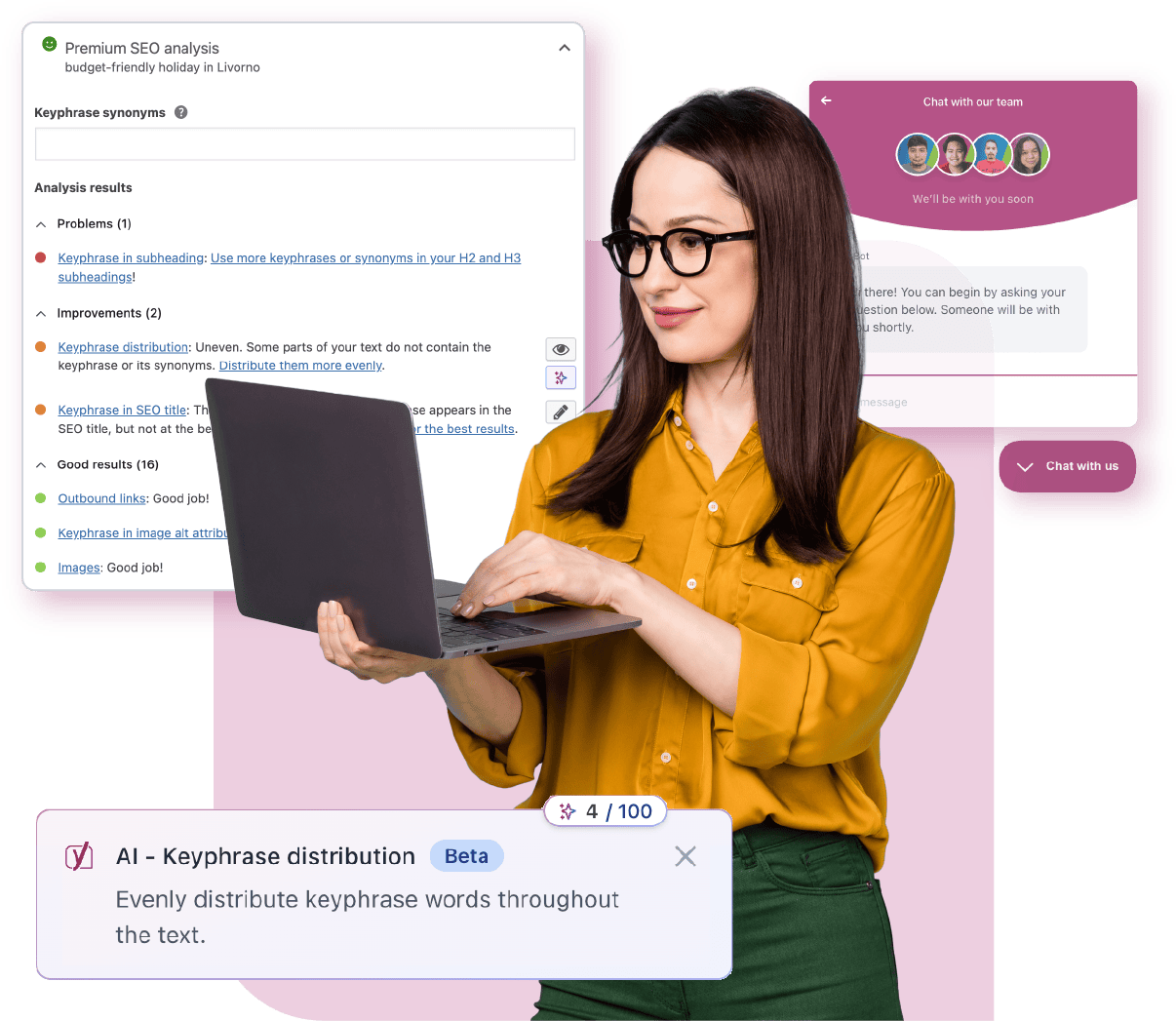
- AI Generate: Creates five SEO-friendly title and meta description options. You can regenerate for more variations.
- AI Optimize: Suggests improvements to keyphrase placement, including introduction, distribution, and density. Each suggestion can be applied or dismissed.
- AI Summarize: Generates a quick summary of a post that you can place anywhere in the block editor.
- AI Content Planner: Suggests five site-specific post ideas and builds a structured starter draft when you open a new post. Ideas are grounded in your own site content rather than generic topics.
- Bulk editor with AI drafts: Lets you filter for pages missing titles or meta descriptions, then draft them in bulk for review.
Every AI suggestion requires approval before it saves. That approval workflow matters for teams that need editorial control over published metadata.
Schema, AI search, and the shift beyond Google
Search behavior is changing. People ask AI assistants directly, and those systems pull from content they have crawled, understood, and trusted. Yoast has responded with features aimed at AI readiness.
- Structured data: Yoast generates schema automatically, including E-E-A-T signals that help systems understand authorship and expertise.
- Schema aggregation for NLWeb: Combines your site's structured data into a single deduplicated graph, so AI agents get a complete picture in one request.
- LLMs.txt management: Guides how large language models interact with your content, with manual control over which pages are included.
- Bot blocker: Lets you control which AI crawlers can use your content for training, including GPTBot, CCBot, and Google-Extended.
- Abilities API: Allows AI tools and automated workflows to read SEO, readability, and inclusive language scores programmatically.
These features are part of a broader shift toward AI visibility, where being cited by AI search engines becomes as important as ranking in traditional results.
Where Yoast stops and content automation begins
Yoast is an optimization and technical SEO plugin. It helps you improve content you have already written. It does not plan topics, research keywords at scale, or publish content on a schedule.
That distinction matters for teams trying to scale content operations. Yoast handles the last mile: the analysis, the schema, the metadata, the redirects. But the first mile, deciding what to write, researching the market, and producing drafts consistently, sits outside its scope.
This is where platforms like AgentBooks fit. AgentBooks is an AI content marketing automation platform that crawls a website to build a reusable source of truth, maps the market, plans topics, generates articles with approval workflows, and publishes to a hosted content site. It connects product understanding, keyword planning, article creation, and publishing in one workspace.
For a WordPress site using Yoast, the two can work together. AgentBooks can handle topic planning and draft generation, while Yoast handles on-page optimization and technical SEO after the content is in WordPress. The handoff is manual, but the division of labor is clear.
If you are evaluating how AI content tools connect to broader marketing systems, this piece on CRM QuickCreator: How AI Content Connects to Your CRM explores how content workflows integrate with lead management.
Practical workflow: Yoast plus a content engine
Here is a realistic workflow for a small team using both tools.
- Plan topics using keyword research and market mapping. This can happen in AgentBooks, a spreadsheet, or a dedicated SEO tool.
- Draft content either manually or with AI assistance. If using AgentBooks, the draft arrives with structure and keyword coverage already in place.
- Import into WordPress and run Yoast's SEO and readability analysis. Fix keyphrase placement, heading structure, and readability issues.
- Optimize metadata using Yoast's AI Generate or manual editing. Check the social preview.
- Publish and let Yoast handle sitemap updates, schema output, and indexation signals.
- Monitor performance through Google Search Console or Wincher integration, then update content as needed.
This workflow keeps the technical SEO burden on Yoast and the content production burden on whatever system you use to plan and write.
Common questions about Yoast SEO on WordPress
Is Yoast SEO free?
Yes. The core plugin is free and includes real-time analysis, readability checks, XML sitemaps, and basic schema markup. Premium adds AI tools, redirect management, internal linking suggestions, and support.
Does Yoast SEO work with any WordPress theme?
Yes. Yoast SEO is compatible with Gutenberg, the Classic Editor, Elementor, and most major themes. It also integrates with Google Site Kit, Semrush, Wincher, and Advanced Custom Fields.
Can I use Yoast SEO on multiple sites?
One Premium subscription covers one site or domain. You can purchase multiple subscriptions, and bulk purchases qualify for a discount. Staging sites can be added and managed through MyYoast.
Does Yoast SEO help with AI search engines?
Yoast includes schema markup, schema aggregation for NLWeb, LLMs.txt management, and a bot blocker for AI crawlers. These features help AI systems understand your content and give you control over how it is used.
What is the difference between Yoast SEO and AgentBooks?
Yoast SEO optimizes content on WordPress and handles technical SEO. AgentBooks is a content marketing automation platform that plans topics, generates articles, and publishes content. They solve different parts of the content lifecycle and can be used together.
Related reading
- Machined Meaning: Definition, Synonyms, and AI Content Use - Machined means made or finished by machine, or cut and shaped with precision. Learn the definition, synonyms, and why the word now describes AI content workflows.
- ContentBot.ai Review: Features, Pricing, and Alternatives - An honest ContentBot.ai review covering its AI flows, blog writer, pricing, and limitations, plus how it compares to full content automation platforms.
Sources and further reading
- Yoast SEO – Advanced SEO with real-time guidance and built-in AI - Real-time SEO guidance, schema, and AI built in. Help search engines and AI systems understand your content. All AI tools included, no hidden fees.
- Yoast SEO Premium - Designed for in-house marketers, creators, and entrepreneurs using WordPress. Get real-time SEO guidance, AI-assisted content optimization, and Local, News & Video SEO in Yoast SEO Premium. No expert knowledge needed.
- Yoast SEO - Yoast SEO helps you improve your site’s content and structure with built-in tools for keywords, schema and readability, no expertise required.
Conclusion
Yoast SEO remains a practical, well-supported choice for WordPress SEO. It handles the technical groundwork, provides clear editorial feedback, and has added AI features that keep pace with how search is evolving. For most WordPress sites, it is a sensible default.
The decision between free and Premium comes down to scale and workflow. If you are managing a handful of pages, free covers the essentials. If you are running a content operation with multiple contributors, redirects, and a growing library of posts, Premium earns its place.
And if your bottleneck is not optimization but production, pairing Yoast with a content automation platform like AgentBooks can close the gap between planning and publishing. For a deeper look at optimizing content systematically, see this SEO content optimization framework.