
ContentBot AI Login: Step-by-Step Access and Troubleshooting
If you already have a ContentBot.ai account, the login process itself is straightforward. What trips people up is everything around it: which URL to use, what to do when a password reset email never arrives, and whether the tool you are signing into still matches how you actually create content. This guide walks through the full login flow, common failure points, and a practical comparison for teams that have outgrown manual AI writing tools.
How to Log In to ContentBot.ai
The official login page lives at https://contentbot.ai/app/. Bookmark that URL instead of the main marketing homepage, which pushes visitors toward feature pages and signup prompts.
Step-by-step access:
- Go to
https://contentbot.ai/app/in your browser. - Enter the email address tied to your ContentBot account.
- Enter your password.
- Click the sign-in button to reach the dashboard.
If you do not have an account yet, use the registration page at https://contentbot.ai/app/register.php. New users land on a welcome screen after creating credentials, and returning users can jump straight into the app.
What You See After Login
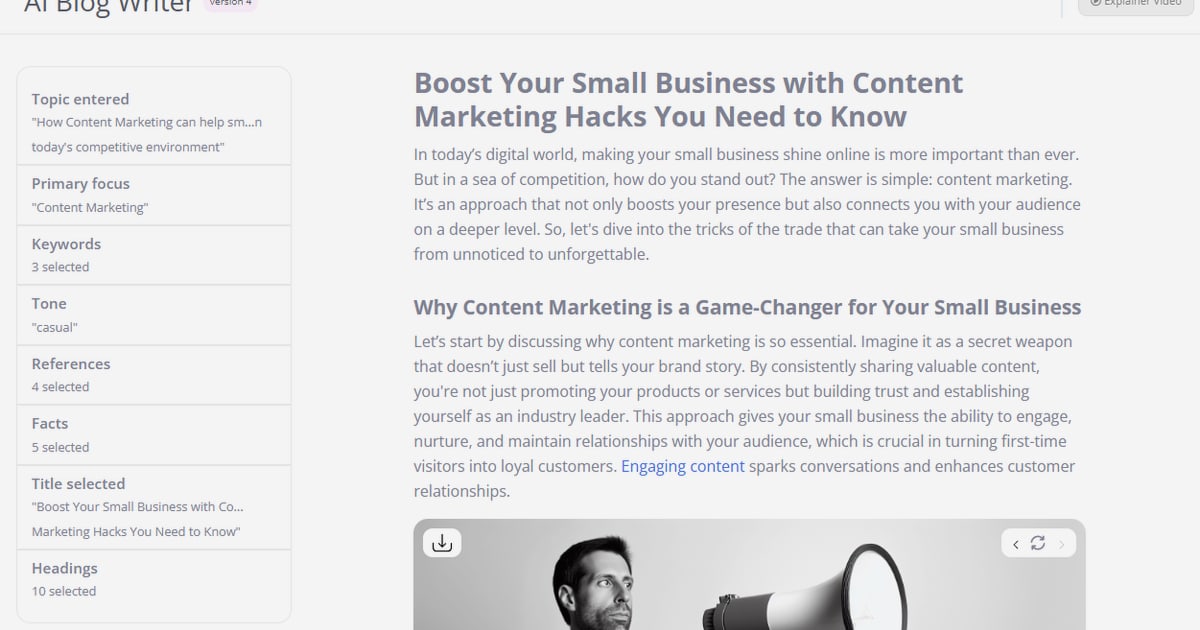
The ContentBot dashboard is built around several core tools:
- AI Blog Writer for long-form drafts
- Flows for multi-step content automation
- Importer for bulk CSV-based generation
- Humanizer for rewriting AI text to bypass detection tools
- Language support across 110+ languages
Once logged in, your first decision is usually whether to start a one-off generation task or configure a Flow. One-off tasks are faster to learn; Flows require more setup but reduce repeated manual work.
Common ContentBot Login Problems and Fixes
ContentBot AI Login: Step-by-Step Access and Troubleshooting - Common ContentBot Login Problems and Fixes.
Most sign-in failures fall into a small set of categories. Work through these in order.
1. Wrong Email or Password
The most common cause. Check whether you originally signed up with Google OAuth or a direct email and password. If you used Google, a password reset from ContentBot will not help because no ContentBot-specific password exists. Sign in through the Google option instead.
2. Password Reset Email Never Arrives
- Check spam, promotions, and social tabs.
- Wait up to 10 minutes; some mail servers delay transactional email.
- Verify you are checking the same inbox used at signup.
- If nothing arrives, contact ContentBot support directly rather than repeatedly requesting resets, which can trigger rate limits.
3. Session or Cookie Issues
A stale session can cause redirect loops back to the login screen. Clear cookies for contentbot.ai, close the browser completely, and try again. This also fixes the problem where the app loads but shows a blank dashboard.
4. Browser or Extension Conflicts
Ad blockers and privacy extensions occasionally block the authentication scripts ContentBot uses. Try an incognito or private window with extensions disabled. If login works there, whitelist contentbot.ai in your extension settings.
5. Account Deactivated or Expired
If you were on a trial or a legacy plan, the account may have lapsed. The login page usually shows a generic error rather than explaining this. Contact support with the email address on file to confirm account status.
ContentBot vs. Autonomous Content Platforms
ContentBot is a strong tool for hands-on creators who want to generate copy, blog drafts, and marketing snippets on demand. You log in, pick a tool, enter a prompt, and edit the output. That model works well for copywriters and marketers who want direct control over every piece of text.
The limitation appears when content volume scales. A manual login-and-generate workflow still requires someone to plan topics, research competitors, paste briefs, review drafts, and publish. Each step is a bottleneck.
Platforms like AgentBooks take a different approach. Instead of logging in to operate a writing tool, you share your website once. The platform learns your product, maps your market, plans topics, researches top-ranking pages, and continuously publishes content in your brand voice. You can run it in approval-first mode or let it publish on autopilot.
When to Choose Each
| Need | ContentBot | AgentBooks |
|---|---|---|
| One-off ad copy, slogans, or product descriptions | Strong fit | Not the primary use case |
| Bulk CSV import for product descriptions | Strong fit | Not the primary use case |
| Ongoing blog publishing without manual prompts | Manual effort required | Autonomous publishing |
| SERP research built into the workflow | Limited | Built-in organic research |
| Brand voice consistency across hundreds of posts | Requires manual prompting | Learned automatically from your site |
| Multilingual output | 110+ languages | Multilingual publishing included |
If your team spends hours each week logging in, writing prompts, and editing drafts, the bottleneck is not the AI model—it is the workflow. For a deeper look at how these approaches differ, see this AgentBooks vs Contentpen vs SEO Writing comparison.
How to Make the Most of a ContentBot Login
If you are already committed to ContentBot, a few habits improve the return on every session.
Set Up Flows Early
Flows are ContentBot's automation builder. A simple flow might trigger a weekly blog draft, run it through the Humanizer, and email the result. Setting this up once removes the need to manually generate recurring content types. The upfront configuration takes 30–60 minutes but pays off quickly for weekly publishing schedules.
Use the Importer for Bulk Work
For e-commerce teams with hundreds of products, the Importer is the highest-leverage feature. Upload a CSV with product attributes, map variables to a prompt template, and receive generated descriptions in bulk. This is far more efficient than generating one product at a time through the standard interface.
Keep a Prompt Library
ContentBot does not remember your best prompts across sessions unless you save them externally. Maintain a shared document with proven prompts for blog intros, ad copy, tone changes, and bullet expansion. Paste them in at the start of each session instead of rewriting from scratch.
Review Before Publishing
ContentBot notes that 95% of generated content is unique, and it provides uniqueness scores for longer pieces. Still, factual claims, statistics, and product details need human verification. Treat the output as a strong first draft, not a final publishable asset.
What to Do If You Cannot Recover Your Account
If password resets fail and support is slow to respond, you have a few options:
- Check for a team account. If a colleague or agency created the account, they may need to re-invite you rather than you resetting the password.
- Export what you can. If you still have partial access, export any saved Flows, prompt templates, or generated content before the account becomes fully inaccessible.
- Evaluate alternatives. Losing access is a forcing function. If manual AI writing was already slowing your team down, this is a good moment to evaluate autonomous platforms like AgentBooks that do not require daily logins to keep content moving.
Related reading
- Machinedrum: Albums, Discography, and Where to Start - Explore Machinedrum’s 25-year discography, from 2001 to 3FOR82_D3LUX3 and BL00MS. Learn about Travis Stewart’s sound, key albums, and where to start.
- Surfer Dude Cast: Every Actor in the 2008 Movie - See the full Surfer Dude cast list, main characters, supporting roles, and where the 2008 Matthew McConaughey movie was filmed.
- Surfer Hair: How to Get the Look in 2026 - Learn what surfer hair is, the best surfer hairstyles for men and women, how to style it step by step, and the products that actually work.
Sources and further reading
- The Future of Writing is Here - Your ultimate AI Workflow solution. Create custom AI Content Flows and streamline your content creation process.
- The Future of Writing is Here - ContentBot is the perfect assistant for copywriters and markers. Overcome writer's block and create high quality content with ContentBot.ai
Frequently Asked Questions
Where is the ContentBot AI login page?
The login page is at https://contentbot.ai/app/. The registration page is at https://contentbot.ai/app/register.php.
Can I log in to ContentBot with Google?
Yes, if you originally created your account using Google OAuth. In that case, always use the Google sign-in option rather than a password reset.
Does ContentBot offer a free plan?
ContentBot has offered trial and limited free options over time, but plan details change. Check the pricing section after logging in or contact support for current plan availability.
What AI model does ContentBot use?
ContentBot primarily uses GPT-4 by OpenAI, along with a variety of other models depending on the task.
Who owns the content generated by ContentBot?
You do. ContentBot does not claim copyright over content generated by the AI for you.
Is ContentBot better than an autonomous content platform?
It depends on your workflow. ContentBot suits hands-on creators who want direct control over individual pieces. Autonomous platforms like AgentBooks suit teams that want ongoing publishing without manual prompts, topic planning, or draft review on every post.
Conclusion
Logging in to ContentBot.ai is simple once you know the correct URL and which sign-in method your account uses. Most problems come down to OAuth confusion, delayed reset emails, or stale browser sessions—all fixable in a few minutes. The bigger question is whether a manual AI writing tool still fits your content operation. If you are logging in daily to prompt, edit, and publish, an autonomous platform that handles research, planning, and publishing may be the more scalable path. If you prefer hands-on control over every draft, ContentBot remains a capable and flexible option.